Run Date Difference Calculator
Date Difference Calculator: Find the exact time between two dates in years, months, days, weeks, and business days, with the option to include the end date.
Date Difference Math Explained
Counting Days
The calculator counts calendar days from the start date up to the end date. By default the end date is not counted, so Monday to Tuesday is 1 day. Choose “include the end date” to count both days.
Total Days = End Date − Start Date
Weeks = Total Days ÷ 7
Hours = Total Days × 24
Years, Months, and Days
Months have 28 to 31 days, so the calculator counts whole years first, then whole months, then the remaining days, using the real lengths of the months and leap years.
How Many Days Are Between Two Dates?
A date difference calculator measures the time between two calendar dates. Enter a start date and an end date, and it returns the total number of days along with the same span expressed in years, months, and days, in weeks, in hours, and in business days.
Counting days by hand is surprisingly error-prone. Months have different lengths, leap years add an extra day to February, and it is easy to be off by one depending on whether the end date is counted.
This calculator handles all of that automatically. It uses the real lengths of every month, accounts for leap years, and lets you choose whether to include the end date.
Below you will find how the calculation works, worked examples, and answers to common questions about deadlines, ages, and durations.
What Is a Date Difference Calculator?
A date difference calculator is a date-duration tool. It answers questions such as “How many days until my vacation?”, “How long ago did the project start?”, or “How many working days are in this contract period?”
Different situations call for different units. A loan period may be described in months, a pregnancy in weeks, a delivery deadline in business days, and a countdown in days. The calculator shows all of these at once so you can use whichever fits your purpose.
How Does the Date Difference Calculator Work?
- Read both dates: If the end date is earlier than the start date, the dates are swapped so the result is always positive.
- Apply the end-date option: If you choose to include the end date, one day is added to the span.
- Count calendar days: The calculator subtracts the dates and converts the difference to whole days.
- Break the span into years, months, and days: Whole years are counted first, then whole months, then the remaining days.
- Count business days: Every day in the span is checked, and Saturdays and Sundays are excluded.
The core formulas are:
Total Days = End Date − Start Date
Weeks = Total Days ÷ 7
Hours = Total Days × 24
Business Days = Total Days − Saturdays − Sundays
The calculation uses whole calendar dates without time zones, so daylight saving time changes never cause a day to be lost or gained.
Should You Include the End Date?
This is the most common source of confusion when counting days.
- Excluding the end date (the standard method) counts the number of days that pass. From Monday to Tuesday is 1 day.
- Including the end date counts every calendar day touched by the period. Monday through Tuesday is 2 days.
Use the standard method for elapsed time, ages, and countdowns. Include the end date when counting days of an event, a hotel stay measured in days rather than nights, or a period where both the first and last days count, such as “from March 1 through March 31.”
| Period | End Date Excluded | End Date Included |
|---|---|---|
| Mon to Tue | 1 day | 2 days |
| Mar 1 to Mar 31 | 30 days | 31 days |
| Jan 1 to Dec 31 (2026) | 364 days | 365 days |
Date Difference Example: A Multi-Year Span
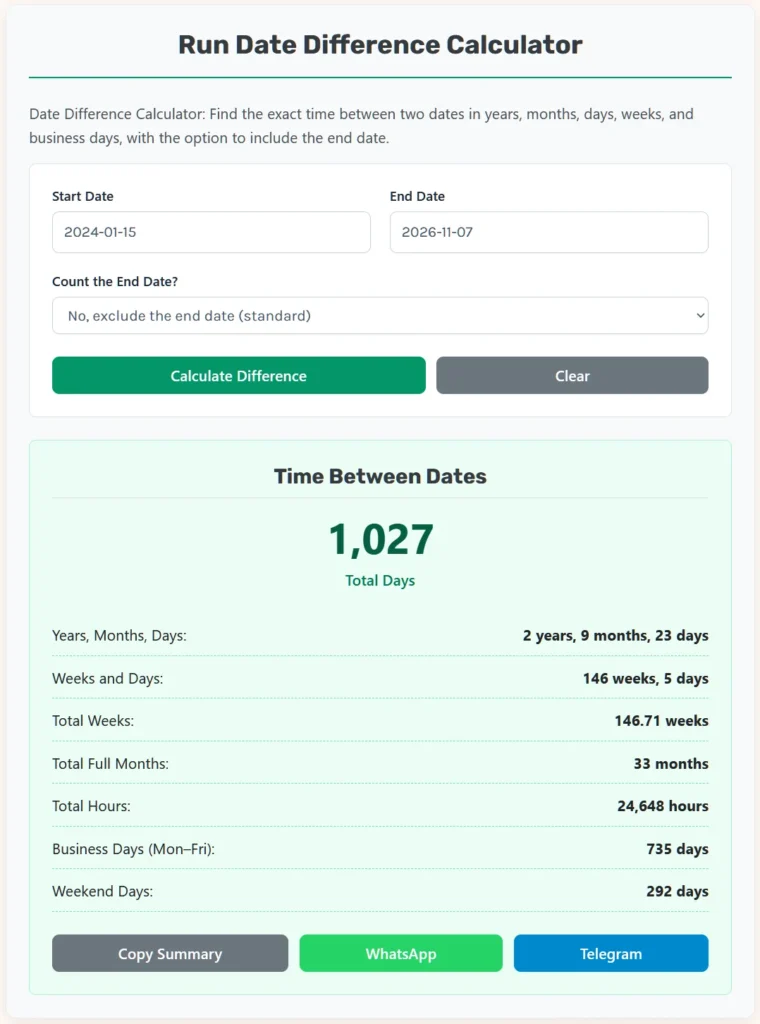
How long is it from January 15, 2024 to November 7, 2026?
Step 1: Total days
Counting every day, the span is 1,027 days. It includes February 29, 2024, because 2024 is a leap year.
Step 2: Years, months, and days
- January 15, 2024 to January 15, 2026 = 2 years
- January 15, 2026 to October 15, 2026 = 9 months
- October 15, 2026 to November 7, 2026 = 23 days
Result: 2 years, 9 months, 23 days
Step 3: Weeks
1,027 ÷ 7 = 146 weeks and 5 days (146.71 weeks)
Step 4: Business days
Excluding weekends, the span contains 735 business days.
Date Difference Example: A Full Calendar Year
From January 1, 2026 to December 31, 2026:
- Excluding the end date: 364 days, of which 260 are business days
- Including the end date: 365 days, of which 261 are business days
The extra business day appears because December 31, 2026 falls on a Thursday.
Date Difference Example: February in a Leap Year
From February 1, 2024 to March 1, 2024 is 29 days, because 2024 is a leap year. The same span in 2025 is 28 days. The calculator always uses the correct length of February for the year you enter.
How Leap Years Affect Date Calculations
The Gregorian calendar adds a leap day, February 29, to keep the calendar aligned with Earth’s orbit. According to the U.S. Naval Observatory, every year exactly divisible by 4 is a leap year, except century years, which are leap years only if they are also divisible by 400.
- 2024 and 2028 are leap years.
- 1900 was not a leap year.
- 2000 was a leap year.
- 2100 will not be a leap year.
Over a long span, these rules matter. That is why an average year is 365.2425 days in the Gregorian calendar, not exactly 365.25.
Why Months Make Date Math Tricky
Months contain 28, 29, 30, or 31 days. As a result, “one month” is not a fixed number of days. The calculator follows the common calendar convention:
- A month is counted from a date to the same date in the next month, such as April 10 to May 10.
- If the day number has not been reached yet in the final month, the calculator counts back one month and adds the remaining days using the actual length of the previous month.
- Years are counted from a date to the same date in a later year.
This is the same method most people use when stating ages and durations, such as “2 years, 9 months, and 23 days.”
How to Calculate Days Between Dates by Hand
For dates in the same year, a quick manual method uses the day of the year. Each date has a position from 1 (January 1) to 365 or 366 (December 31). Subtract the positions to get the difference.
| Month | Days in Month | Days Before Month Starts (Common Year) | Days Before Month Starts (Leap Year) |
|---|---|---|---|
| January | 31 | 0 | 0 |
| February | 28 or 29 | 31 | 31 |
| March | 31 | 59 | 60 |
| April | 30 | 90 | 91 |
| May | 31 | 120 | 121 |
| June | 30 | 151 | 152 |
| July | 31 | 181 | 182 |
| August | 31 | 212 | 213 |
| September | 30 | 243 | 244 |
| October | 31 | 273 | 274 |
| November | 30 | 304 | 305 |
| December | 31 | 334 | 335 |
For example, in 2025 (a common year), March 1 is day 59 + 1 = 60, and June 30 is day 151 + 30 = 181.
181 − 60 = 121 days
That matches the calculator’s result for March 1 to June 30, 2025. For spans that cross years, count the days remaining in the first year, add 365 or 366 for each full year in between, and add the day number in the final year.
Example: Counting Down to an Event
Suppose today is November 7, 2026 and you want to know how long it is until December 25, 2026.
- November 7 is day 304 + 7 = 311.
- December 25 is day 334 + 25 = 359.
359 − 311 = 48 days
That is 6 weeks and 6 days. Excluding weekends, the calculator counts the business days in the span for planning work before the holiday.
Month-End Dates
Dates at the end of a month need special care, because not every month has a 29th, 30th, or 31st. The calculator follows the common convention of moving to the last day of a shorter month.
For example, from January 31, 2024 to March 1, 2024 is 30 days. The calculator expresses it as 1 month and 1 day: one month takes you from January 31 to February 29 (the last day of February 2024), and one more day reaches March 1.
Different systems can treat month-end dates differently. When exact months matter for contracts or billing, check the method your agreement specifies.
Business Days vs. Calendar Days
Business days, also called working days or weekdays, count Monday through Friday. They are used for shipping estimates, payment terms, legal deadlines, and project schedules.
The calculator counts every weekday within the span. It does not remove public holidays, because holidays differ by country, region, and organization. To get working days net of holidays, subtract the number of holidays that fall on weekdays within your range.
| Span | Calendar Days | Business Days |
|---|---|---|
| 1 week | 7 | 5 |
| 4 weeks | 28 | 20 |
| Mar 1 to Jun 30, 2025 (end excluded) | 121 | 85 |
| Full year 2026 (end included) | 365 | 261 |
Common Uses of a Date Difference Calculator
Countdowns
Find how many days remain until a birthday, wedding, holiday, or product launch.
Age and Anniversaries
Calculate exact age or the length of a relationship, employment, or membership in years, months, and days.
Project Planning
Measure the duration of a project phase in calendar days and business days.
Contracts and Deadlines
Check notice periods, warranty periods, and payment terms. Always confirm whether the contract counts the first and last days.
Health and Pregnancy Tracking
Count weeks and days between dates, such as from the start of a treatment to a follow-up appointment.
History and Genealogy
Measure the time between historical events or ancestors’ life dates. For dates before your country adopted the Gregorian calendar, be aware that historical records may use the older Julian calendar.
Common Mistakes When Counting Days
Off-by-One Errors
Decide whether the end date counts before you calculate. Mixing the two methods is the most frequent error.
Assuming Every Month Has 30 Days
Using 30 days per month introduces errors that grow over longer spans. The calculator uses real month lengths.
Forgetting Leap Days
Spans that include February 29 are one day longer than the same span in a common year.
Confusing Business Days With Calendar Days
A deadline of “10 business days” is two full weeks, not 10 calendar days.
Ignoring Holidays
Business day counts in the calculator exclude weekends only. Remove holidays manually where needed.
Quick Reference: Time Conversions
| Unit | Equivalent |
|---|---|
| 1 week | 7 days |
| 1 common year | 365 days (52 weeks + 1 day) |
| 1 leap year | 366 days (52 weeks + 2 days) |
| Average Gregorian year | 365.2425 days |
| 1 day | 24 hours = 1,440 minutes |
Frequently Asked Questions About Date Differences
How do I calculate the number of days between two dates?
Subtract the start date from the end date. The calculator does this automatically using real month lengths and leap years.
Does the calculator include the end date?
Not by default. Choose “include the end date” to add one day so that both the first and last days are counted.
How many days are in a year?
A common year has 365 days and a leap year has 366 days. The Gregorian calendar averages 365.2425 days per year.
How are business days calculated?
The calculator counts Monday through Friday within the span and excludes Saturdays and Sundays. Public holidays are not excluded.
What happens if I enter the end date before the start date?
The calculator swaps the dates and shows the positive difference, with a note that the dates were swapped.
How are months counted?
A month is counted from a date to the same date in the following month. Remaining days are counted using the actual length of the month.
Does daylight saving time affect the result?
No. The calculator compares whole calendar dates without time zones, so daylight saving changes do not affect the count.
How many weeks are between two dates?
Divide the total number of days by 7. The calculator shows both whole weeks with remaining days and decimal weeks.
Is 2024 a leap year?
Yes. 2024 is divisible by 4 and is not a century year, so it has a February 29.
Can I calculate my age with this tool?
Yes. Enter your birth date as the start date and today’s date as the end date to see your age in years, months, and days.
What the Date Difference Calculator Does Not Determine
- Public holidays or company-specific non-working days
- Time-of-day differences in hours and minutes between specific times
- Time zone differences
- Dates in calendars other than the Gregorian calendar
- Legal interpretation of deadlines or notice periods
Best Practices for Accurate Date Calculations
- Confirm whether your situation counts the end date.
- Double-check the year, especially near January 1.
- Remove holidays separately when counting working days.
- Use the years-months-days result for ages and anniversaries.
- Use total days or business days for deadlines and schedules.
Scientific Basis and Reliable Sources
The calculator applies the Gregorian calendar rules for month lengths and leap years and counts days using Coordinated Universal Time dates, which avoids daylight saving time effects.
U.S. Naval Observatory — Introduction to Calendars
The USNO explains the Gregorian calendar, including the leap year rule that century years are leap years only when divisible by 400.
Final Date Difference Checklist
- Start and end dates entered correctly
- End date option chosen to match your situation
- Leap years handled automatically
- Business days adjusted for holidays if needed
- Result unit chosen to match your purpose
With the date difference calculator, you can measure any span of time between two dates quickly and accurately.