Run Money Calculator | Cash Counter
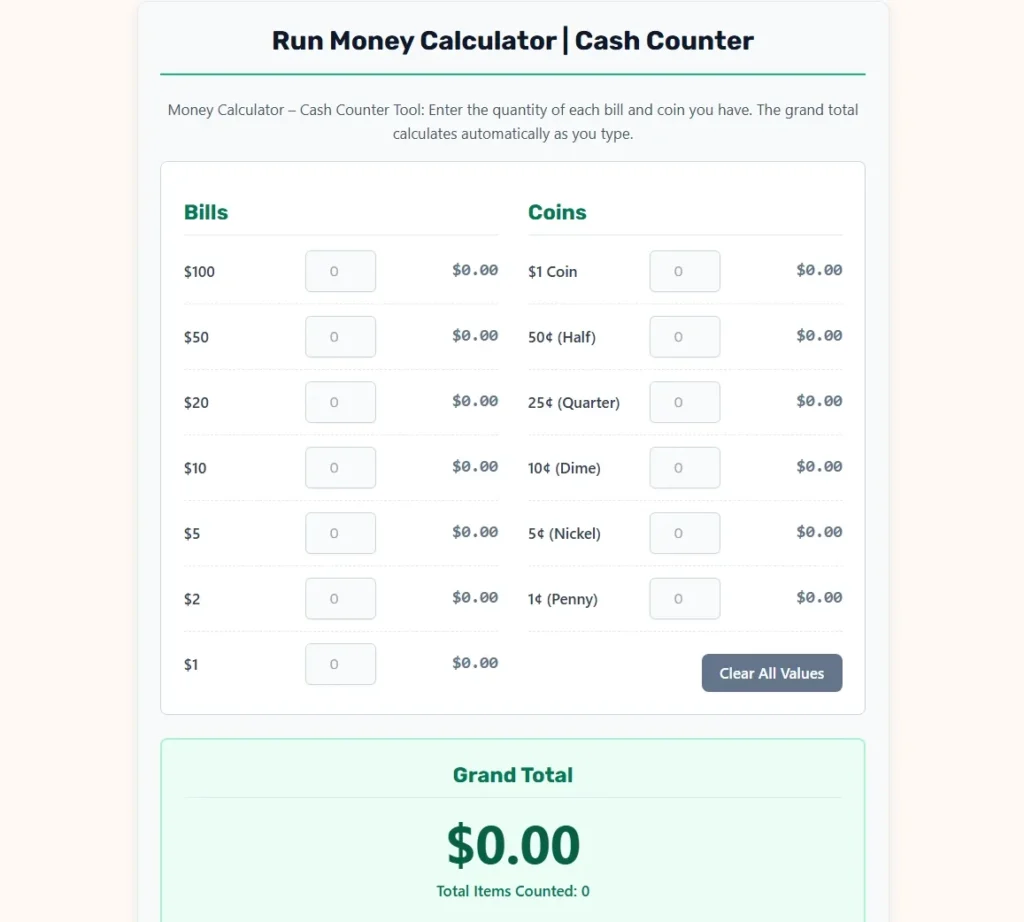
Money Calculator – Cash Counter Tool: Enter the quantity of each bill and coin you have. The grand total calculates automatically as you type.
Grand Total
$0.00Total Items Counted: 0
Money Calculator: How to Count Cash, Bills, and Coins Accurately
A money calculator, also known as a cash counter or bill and coin calculator, is a practical tool for calculating the total value of physical cash. Whether you’re counting money in a cash register, preparing a bank deposit, organizing personal savings, or checking daily business earnings, a money calculator helps you determine the total quickly and accurately.
Instead of manually adding individual banknotes and coins, you enter the quantity of each denomination. The calculator multiplies each quantity by its monetary value and combines the results into a grand total.
This online money calculator supports US dollar bills and coins, making it useful for cashiers, business owners, retail employees, students, and anyone handling physical currency.
What Is a Money Calculator?
A money calculator is a digital counting tool that determines the monetary value of a collection of banknotes and coins.
Unlike a traditional calculator, which requires you to enter individual arithmetic operations, a cash counter organizes money by denomination.
For example, instead of manually calculating the value of 12 twenty-dollar bills, 8 five-dollar bills, and 15 quarters, you enter those quantities into their corresponding fields.
The tool automatically calculates the total for each denomination and adds everything together.
A money calculator is particularly useful when handling large quantities of mixed currency because it reduces repetitive calculations and makes counting easier to verify.
How Does the Money Calculator Work?
The calculator uses a simple mathematical principle: multiply the quantity of each denomination by its face value, then add the results.
The calculation involves three elements:
- Denomination: The monetary value printed on a bill or assigned to a coin.
- Quantity: The number of bills or coins of that denomination.
- Subtotal: The combined value of those identical bills or coins.
The formula is:
Denomination Subtotal = Denomination Value × Quantity
The overall calculation is:
Total Cash = Sum of All Denomination Subtotals
For example, if you have 6 twenty-dollar bills:
$20 × 6 = $120
If you also have 10 quarters:
$0.25 × 10 = $2.50
Your combined total becomes:
$120 + $2.50 = $122.50
The calculator performs these operations automatically as quantities are entered.
How to Use the Online Cash Counter
- Separate your physical cash into bills and coins.
- Organize the money according to denomination.
- Count how many pieces you have of each denomination.
- Enter the quantities into the corresponding calculator fields.
- Review the subtotal displayed beside each denomination.
- Check the grand total and total number of items.
- Copy or share the calculation breakdown when necessary.
The calculator updates its results as you type, so there is no need to press a separate calculation button.
US Dollar Bills and Their Values
US paper currency is issued in several denominations. The calculator supports the following bill values:
| Bill Denomination | Value of 10 Bills | Value of 50 Bills |
|---|---|---|
| $1 | $10 | $50 |
| $2 | $20 | $100 |
| $5 | $50 | $250 |
| $10 | $100 | $500 |
| $20 | $200 | $1,000 |
| $50 | $500 | $2,500 |
| $100 | $1,000 | $5,000 |
The $2 bill is less commonly encountered in everyday transactions, but it remains a valid US currency denomination.
According to the Federal Reserve, the United States currently issues paper currency in denominations of $1, $2, $5, $10, $20, $50, and $100.
US Coins and Their Values
The calculator also supports six coin denominations.
| Coin | Value in Cents | Value in Dollars |
|---|---|---|
| Penny | 1¢ | $0.01 |
| Nickel | 5¢ | $0.05 |
| Dime | 10¢ | $0.10 |
| Quarter | 25¢ | $0.25 |
| Half Dollar | 50¢ | $0.50 |
| Dollar Coin | 100¢ | $1.00 |
Coins are calculated using their dollar equivalents.
For example:
40 quarters × $0.25 = $10.00
30 dimes × $0.10 = $3.00
20 nickels × $0.05 = $1.00
The combined value is:
$10 + $3 + $1 = $14.00
The United States Mint provides official information about US circulating coin denominations.
Example: Counting a Cash Drawer
Suppose a cashier finishes a shift and needs to count the money remaining in the register.
The drawer contains the following quantities:
| Denomination | Quantity | Subtotal |
|---|---|---|
| $100 bills | 2 | $200.00 |
| $50 bills | 3 | $150.00 |
| $20 bills | 8 | $160.00 |
| $10 bills | 6 | $60.00 |
| $5 bills | 10 | $50.00 |
| $1 bills | 15 | $15.00 |
| Quarters | 20 | $5.00 |
| Dimes | 15 | $1.50 |
| Nickels | 10 | $0.50 |
| Pennies | 25 | $0.25 |
| Grand Total | 114 | $642.25 |
The drawer contains $642.25 across 114 individual bills and coins.
This example demonstrates the difference between the monetary total and the number of physical items.
A cash counter can calculate both measurements independently.
Understanding the Grand Total and Item Count
The calculator displays two important results.
Grand Total
The grand total represents the combined monetary value of every bill and coin entered.
For example, 5 one-hundred-dollar bills and 20 quarters produce:
(5 × $100) + (20 × $0.25) = $505.00
Total Items Counted
The item count represents the number of individual bills and coins, regardless of denomination.
Using the same example:
5 bills + 20 coins = 25 items
Therefore:
- Grand Total: $505.00
- Total Items: 25
These figures serve different purposes. The grand total measures monetary value, while the item count helps verify physical quantities.
Common Uses of a Money Calculator
Retail Cash Register Reconciliation
Retail employees frequently count cash before opening or after closing a register.
A money calculator makes it easier to determine the physical cash balance and compare it with the expected register amount.
Preparing Bank Deposits
Businesses can organize bills and coins before preparing cash deposits.
A denomination breakdown helps employees document how much money is being submitted.
Counting Personal Savings
People who save cash in envelopes, jars, or money boxes can calculate their accumulated savings without manually adding every piece.
Restaurant and Hospitality Operations
Restaurants, cafés, and hospitality businesses often handle cash transactions throughout the day.
A cash counter can assist with shift changes, register checks, and end-of-day counting.
School and Educational Activities
Teachers can use denomination counting to help students understand money values, multiplication, addition, and decimal arithmetic.
Fundraising and Community Events
Organizations collecting cash donations can use a money calculator to count contributions and prepare financial records.
How to Balance a Cash Register
Balancing a cash register means comparing the actual cash counted with the amount that should be present according to transaction records.
The basic formula is:
Cash Difference = Actual Cash − Expected Cash
Suppose the register should contain 850, but the physical count totals $842.
$842 − $850 = −$8
The register is short by $8.
If the physical count is $858 instead:
$858 − $850 = +$8
The register has an $8 overage.
A positive difference indicates excess cash, while a negative difference indicates a shortage.
The money calculator determines the actual cash total. The comparison with the expected balance must be performed separately.
How to Calculate Cash Deposits
A cash deposit calculation involves determining the total amount of money being prepared for deposit.
For example, suppose a business has:
- 15 × $100 bills = $1,500
- 20 × $50 bills = $1,000
- 30 × $20 bills = $600
- 40 × $10 bills = $400
The total deposit is:
$1,500 + $1,000 + $600 + $400 = $3,500
If the business needs to retain $200 as its opening cash float:
Deposit Amount = Total Cash − Retained Cash
$3,500 − $200 = $3,300
The deposit amount would be $3,300, assuming no other adjustments are required.
Money Counting vs. Money Conversion
A money calculator and a currency converter perform different tasks.
A money counter calculates the total value of bills and coins within one currency.
A currency converter estimates the equivalent value between different currencies using exchange rates.
For example:
- Counting 10 twenty-dollar bills is a money-counting calculation.
- Converting $200 into euros is a currency-conversion calculation.
This calculator is designed for counting US dollar denominations. It does not convert between currencies or retrieve exchange rates.
How to Count Money Faster and More Accurately
Effective cash counting involves both organization and verification.
The following practices can reduce counting errors:
- Separate bills from coins before beginning.
- Arrange banknotes by denomination.
- Count one denomination at a time.
- Keep counted and uncounted money in separate areas.
- Enter quantities immediately after counting.
- Review unusually large quantities.
- Count again when the total differs from expectations.
- Save the final denomination breakdown for reference.
For business transactions, a second count by another employee may provide additional verification.
A calculator eliminates much of the arithmetic work, but it cannot detect a physical counting mistake automatically.
Common Money Counting Mistakes
Confusing Quantity With Value
Entering 100 in the 20 field means 100 twenty-dollar bills, not $100.
The resulting value would be:
100 × $20 = $2,000
Mixing Coin Denominations
Dimes and pennies have different values even though both are relatively small coins.
Twenty dimes equal 2, while twenty pennies equal $0.20.
Counting the Same Money Twice
Always separate completed stacks from uncounted cash.
Forgetting Uncommon Denominations
Two-dollar bills, half-dollar coins, and dollar coins can be overlooked.
Entering Negative Quantities
Physical cash counting uses nonnegative whole-number quantities. A shortage should be recorded separately rather than represented by entering negative bills.
Failing to Verify the Final Amount
For financial records, compare the calculator result against a second count or supporting transaction documentation.
Manual Money Counting Formula
For a complete US cash count, the calculation can be expressed as:
Total Bills = ($100 × A) + ($50 × B) + ($20 × C) + ($10 × D) + ($5 × E) + ($2 × F) + ($1 × G)
Where A through G represent the quantities of the corresponding bills.
For coins:
Total Coins = ($1 × H) + ($0.50 × I) + ($0.25 × J) + ($0.10 × K) + ($0.05 × L) + ($0.01 × M)
The final calculation is:
Grand Total = Total Bills + Total Coins
This method works for any combination of supported denominations.
Money Calculator vs. Cash Counting Machine
A digital money calculator and a physical cash counting machine serve related but different purposes.
| Feature | Online Money Calculator | Physical Cash Counter |
|---|---|---|
| Calculates monetary totals | Yes | Usually |
| Requires manual quantity entry | Yes | Usually no |
| Physically counts banknotes | No | Yes |
| Counts coins automatically | No | Depends on machine |
| Requires specialized hardware | No | Yes |
| Suitable for small cash counts | Yes | Yes |
| Detects counterfeit currency | No | Some models |
An online calculator is particularly useful when dedicated cash-counting equipment is unavailable.
Frequently Asked Questions
How do I calculate the total amount of cash?
Multiply the quantity of each bill or coin by its denomination value, then add all subtotals.
Total Cash = Sum of (Quantity × Denomination Value)
How do I count mixed bills and coins?
Separate money into denominations, count each group, and enter its quantity into the corresponding field. The calculator combines the values automatically.
How much is 100 quarters?
Each quarter is worth $0.25.
100 × $0.25 = $25.00
How much is 200 pennies?
Each penny is worth $0.01.
200 × $0.01 = $2.00
How much is 50 twenty-dollar bills?
50 × $20 = $1,000
How many $20 bills make $1,000?
Divide the target amount by the bill value:
$1,000 ÷ $20 = 50 bills
Can I calculate bills and coins together?
Yes. The calculator combines the entered quantities of supported US banknotes and coins into one grand total.
Does the calculator count money automatically?
It calculates monetary values automatically as you enter quantities. However, it does not physically scan or identify cash.
Can I use it for a business cash drawer?
Yes. It is suitable for preliminary cash drawer counting, shift reconciliation, and deposit preparation. Formal reconciliation still requires comparison with transaction records.
Does the calculator support other currencies?
No. The current calculator uses US dollar denominations and displays results in USD.
Can I save my cash counting results?
The calculator provides a copyable denomination breakdown and sharing options through WhatsApp and Telegram. You can retain the copied information in your own records.
Final Thoughts
A money calculator and cash counter simplifies one of the most common financial tasks: determining the total value of physical cash.
By organizing banknotes and coins according to denomination, the tool replaces repetitive manual arithmetic with automatic calculations.
It is useful for cash registers, business deposits, personal savings, educational activities, and everyday money management.
The essential formula remains:
Total Money = Sum of (Denomination × Quantity)
For accurate results, enter the correct quantities, verify the physical cash, and keep a record of important counts.
Official References
Federal Reserve — U.S. Currency: Official information about United States paper currency denominations and their issuance.
https://www.federalreserve.gov/faqs/currency_12600.htm
United States Mint — Circulating Coins: Official information about US coin denominations, designs, and circulating coin programs.
https://www.usmint.gov/learn/coin-and-medal-programs/circulating-coins
These authoritative government sources establish the denomination values underlying the calculator’s arithmetic and provide reliable references for understanding US bills and coins.