Interactive T-Account Calculator
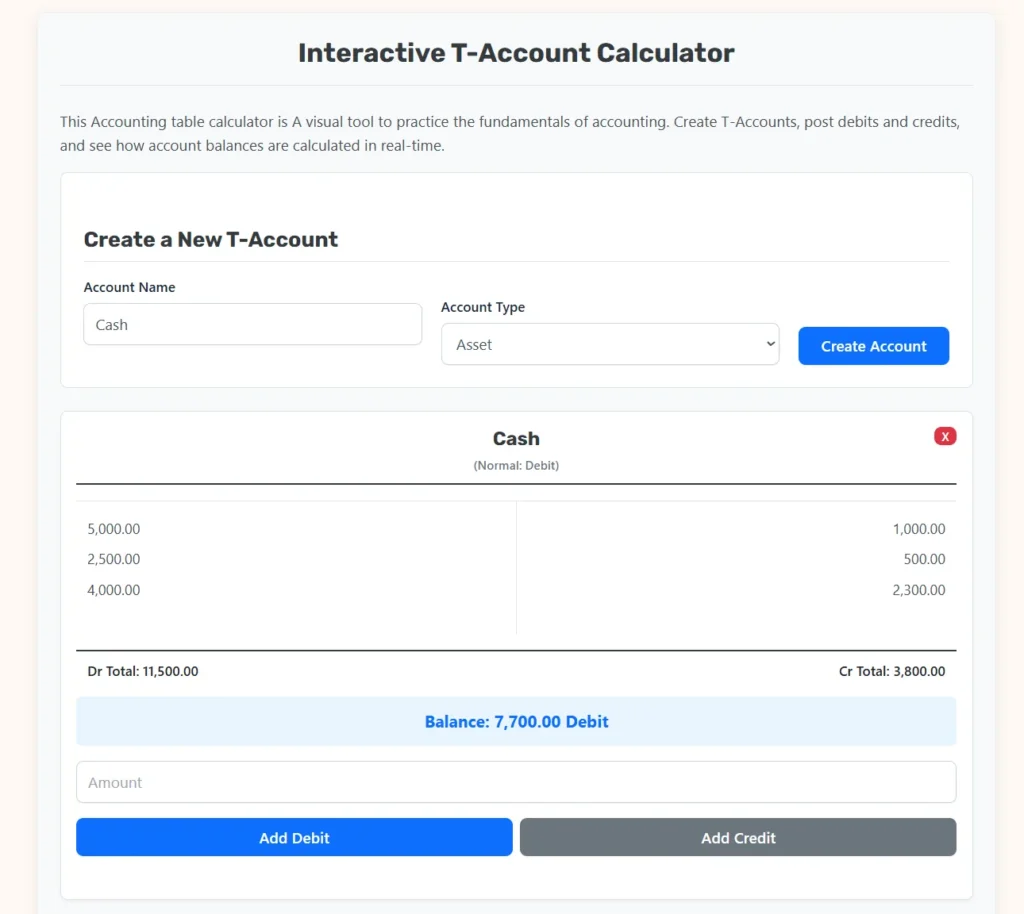
This Accounting table calculator is A visual tool to practice the fundamentals of accounting. Create T-Accounts, post debits and credits, and see how account balances are calculated in real-time.
Create a New T-Account
What is a T-Account?
The Accountant’s Most Basic Tool
A T-Account is a visual aid used in accounting to represent an individual account from the general ledger. It’s called a “T-Account” because it looks like a capital ‘T’.
- The Account Name (like “Cash”) is written on top.
- The left side is always for Debits (Dr).
- The right side is always for Credits (Cr).
By placing entries on the left or right, you can easily add them up to find the account’s final balance. It’s the simplest way to see the “ins and outs” for a specific account.
The Rules of Debits and Credits (DEAD CLIC)
To use T-Accounts, you must know what debits and credits do to different account types. This is the most fundamental rule in all of accounting. A popular mnemonic is DEAD CLIC.
DEAD
Accounts in DEAD are increased with a Debit.
- D = Dividends (or Drawings)
- E = Expenses
- A = Assets
CLIC
Accounts in CLIC are increased with a Credit.
- C = Capital (or Equity)
- L = Liabilities
- I = Income (or Revenue)
The Golden Rule: A Debit *increases* DEAD accounts and *decreases* CLIC accounts. A Credit does the opposite.
Guide to T-Accounts and Double-Entry Bookkeeping
The foundation of modern financial accounting relies on structural systems that ensure mathematical precision, internal control, and clear visibility into corporate performance. The T-Account is the primary visual and structural framework used to organize financial transactions before compiling formalized financial statements.
This guide provides an exhaustive review of T-Account principles, the mathematical equations governing ledger mechanics, structural best practices for accounting systems, and practical transactional frameworks designed to serve both student learners and enterprise financial operators.
Concept and Core Definition of a T-Account
A T-Account is a graphical representation of a single general ledger account, structured in the shape of the capital letter "T". It functions as a operational intermediary between raw journal entries and complex financial reports. By partitioning economic adjustments into two distinct paths, it eliminates narrative complexity and isolates pure numerical shifts.
The anatomy of a T-Account consists of three distinct zones:
- The Header Line: Positioned horizontally across the top, displaying the unique name of the specific account (such as Cash, Accounts Receivable, or Retained Earnings) along with its structural classification.
- The Left Vertical Column: Structurally designated exclusively for Debits, abbreviated historically as Dr.
- The Right Vertical Column: Structurally designated exclusively for Credits, abbreviated historically as Cr.
Every commercial enterprise operates using a structured system called a Chart of Accounts. This index serves as a repository for every asset, liability, equity, revenue, expense, and dividend line item. The T-Account visualizes how cash or obligations flow through these specific nodes within the larger financial system.
                  Account Name
=================================================
  Left Side: Debits (Dr)  |  Right Side: Credits (Cr)
                          |
  Value Increases/        |  Value Decreases/
  Decreases (Based on     |  Increases (Based on
  Account Type Classification)
                          |
The underlying purpose of this structure is to enforce the principle of double-entry bookkeeping, a system codified in 1494 by the Franciscan friar and mathematician Fra Luca Pacioli. Under double-entry principles, no transaction can exist in isolation. Every economic event requires a simultaneous, balancing entry across a minimum of two separate T-Accounts. This dual recording process preserves systemic balance and safeguards against arithmetic errors.
The Double-Entry Accounting Equation and System Mechanics
The functional integrity of T-Accounts is governed by the accounting equation. This formula maps the economic resources controlled by an entity against the claims on those resources by external creditors and internal owners.
The fundamental accounting equation is stated as follows:
Assets = Liabilities + Equity
To unpack how operational actions affect this balance, accounting models utilize the expanded accounting equation. This framework integrates operational performance metrics—revenues and expenses—along with equity distributions to owners via dividends.
The expanded accounting equation is stated as follows:
Assets = Liabilities + Common Stock + Retained Earnings + Revenue - Expense - Dividend
By applying basic algebraic transposition, we can move all negative elements to the left side of the equation. This yields a highly functional formula where all accounts with matching structural characteristics sit together:
Assets + Expenses + Dividends = Liabilities + Common Stock + Revenue
This structural alignment dictates how debits and credits interact with specific ledger accounts:
- Left-Side Accounts: Assets, Expenses, and Dividends increase when a value is posted to their left column (Debit) and decrease when a value is posted to their right column (Credit).
- Right-Side Accounts: Liabilities, Common Stock (Equity), and Revenues increase when a value is posted to their right column (Credit) and decrease when a value is posted to their left column (Debit).
Decoding Debits (Dr) and Credits (Cr)
A common point of confusion for beginners is attributing qualitative meanings to the words "debit" and "credit," often conflating them with everyday banking interactions. In professional accounting, Debit means Left and Credit means Right. They do not mean "plus" or "minus" in a universal sense; their functional impact depends entirely on the account classification being adjusted.
To master this relationship, financial practitioners rely on the structural mnemonic framework known as DEAD CLIC. This framework maps systemic changes into two distinct rulesets based on normal balances.
The DEAD Framework (Left-Side Acceleration)
The letters in the acronym DEAD stand for:
- D → Dividends (and owner drawings)
- E → Expenses (operational costs, wages, rent, cost of goods sold)
- A → Assets (cash, inventory, property, equipment, prepaid expenses)
- D → Debit Increase / Debit Balance
For all accounts falling under this rubric, a debit entry increases the total value of the account, whereas a credit entry decreases it. The normal balance for these accounts sits on the debit side.
The CLIC Framework (Right-Side Acceleration)
The letters in the acronym CLIC stand for:
- C → Capital (Common stock, owner equity, retained earnings)
- L → Liabilities (Accounts payable, notes payable, unearned revenue, accrued debt)
- I → Income (Revenue, sales interest gains)
- C → Credit Increase / Credit Balance
For all accounts falling under this rubric, a credit entry increases the total value of the account, whereas a debit entry decreases it. The normal balance for these accounts sits on the credit side.
The following matrix maps how entries impact account types and details their normal positioning:
| Account Category | Normal Balance Position | Impact of a Debit Entry | Impact of a Credit Entry |
| Asset | Debit (Left) | Increases Value | Decreases Value |
| Expense | Debit (Left) | Increases Value | Decreases Value |
| Dividend | Debit (Left) | Increases Value | Decreases Value |
| Liability | Credit (Right) | Decreases Value | Increases Value |
| Equity / Capital | Credit (Right) | Decreases Value | Increases Value |
| Revenue / Income | Credit (Right) | Decreases Value | Increases Value |
How the Interactive T-Account Calculator Functions
The single-file interactive T-Account application uses client-side web technology to run real-time ledger simulations. Understanding the functional logic beneath the interface helps highlight how automated financial tech processes accounting transactions.
The engine processes data through an internal lifecycle loop:
  User Input (Name, Type) → State Creation (Account Keys)
                                  ↓
  Transaction Input (Amount) → Validation & Parsing (Sanitize Strings)
                                  ↓
  Real-Time Aggregation (Array Reduction Functions)
                                  ↓
  Net Balance Logic (Absolute Variance Direction)
                                  ↓
  Dynamic Interface Update (Render Elements to View)
1. Account Initialization and Memory Storage
When you click the account creation control, the calculator reads your inputs from the text string fields. It sanitizes the name by converting the text to lowercase and replacing spaces with structural hyphens to create a clean database key.
The application sets up a memory object for that key containing:
- The raw account string name.
- The structural account type classification (such as Asset or Revenue).
- An array for tracking debit transactions.
- An array for tracking credit transactions.
2. Input Validation and Value Parsing
When an entry is added to either the debit or credit side of a card, the utility executes safety validation steps. It calls a text parsing function that targets currency formatting commas, strips non-numeric elements, and evaluates the string using a floating-point calculation engine.
If the value is non-numeric or less than or equal to zero, validation rules halt execution to protect ledger integrity.
3. Real-Time Balance Calculations
Once an amount passes validation, the calculator updates the account array and runs an aggregation script. This step mimics the manual balancing process performed by bookkeepers at the close of an accounting period.
The calculator determines total values using summation logic:
Total Debits = Sum of all values in Debits Array
Total Credits = Sum of all values in Credits Array
To find the net status, the system calculates the variance between columns:
Net Balance Variance = Total Debits - Total Credits
4. Conditional UI Rendering Rules
The tool uses conditional logic to decide how to display the final account balances based on the calculated variance:
- Case A (Variance greater than 0): The account carries a net debit balance. The system applies a distinct visual style class (
balance-debit), calculates the value formatting, and labels it as a Debit. - Case B (Variance less than 0): The account carries a net credit balance. The program uses absolute value calculation functions (
Math.abs) to strip the negative sign, applies an alternative style class (balance-credit), and labels it as a Credit. - Case C (Variance exactly equal to 0): The account is completely balanced. The system resets the tracking classes to neutral (
balance-zero) and sets the text to show a zero balance.
Step-by-Step Instructions for the Calculator
The interactive web tool is built to handle ledger entry posting without complex manual ledger balancing. Follow this sequence to track transactions accurately and maintain ledger balance.
1.Create and Classify Your Accounts:Setup Phase.
Identify the specific accounts impacted by your business transaction. Enter a clear name in the Account Name field and select the proper classification from the dropdown list. Click Create Account to generate the visual T-Account panel.
2.Determine Transaction Values and Impacts:Analysis Phase.
Analyze the financial event. Determine which account experiences an increase and which experiences a decrease. Apply the DEAD CLIC matrix to choose the correct column for each account. Ensure your total debit adjustments match your total credit adjustments.
3.Post the Entries to Your T-Accounts:Execution Phase.
Go to the generated account cards. Locate the input field at the bottom of the card and type in the transaction amount. Click Add Debit to post the value to the left column, or Add Credit to post it to the right column.
4.Review the Updated Columns and Net Balance:Verification Phase.
The engine will recalculate totals instantly after each entry. Check the bottom of the card to see the updated totals and net balance alignment. Verify that the final balance matches your expectations for that account type.
Real-World Use Cases and Practical Accounting Scenarios
To demonstrate how the T-Account tool applies to everyday corporate finance, let's explore four real-world business scenarios. These examples walk through the explicit transaction records, debit-credit selections, and balancing math.
Scenario 1: Capital Influx via Equity Investment
An entrepreneur launches a consulting firm and deposits 50,000.00 in cash into a corporate bank account in exchange for common stock.
Strategic Impact Analysis
- The asset account Cash increases by 50,000.00. Under DEAD principles, an asset increase is recorded as a Debit.
- The equity account Common Stock increases by 50,000.00. Under CLIC principles, an equity increase is recorded as a Credit.
Calculator Posting Strategy
- Create a "Cash" account labeled as an Asset.
- Create a "Common Stock" account labeled as Equity.
- Go to the Cash card, enter
50000.00, and click Add Debit. - Go to the Common Stock card, enter
50000.00, and click Add Credit.
Ledger Balance Evaluation
- Cash Account: Total Dr = 50,000.00 | Total Cr = 0.00 → Net Balance = 50,000.00 Debit
- Common Stock Account: Total Dr = 0.00 | Total Cr = 50,000.00 → Net Balance = 50,000.00 Credit
Scenario 2: Equipment Acquisition via Credit Obligations
The firm buys enterprise server machinery valued at 12,000.00 from an infrastructure vendor. The vendor allows the firm to pay the invoice within 30 days.
Strategic Impact Analysis
- The asset account Equipment increases by 12,000.00. An asset increase requires a Debit.
- The liability account Accounts Payable increases by 12,000.00. A liability increase requires a Credit.
Calculator Posting Strategy
- Create an "Equipment" account labeled as an Asset.
- Create an "Accounts Payable" account labeled as a Liability.
- Go to the Equipment card, enter
12000.00, and click Add Debit. - Go to the Accounts Payable card, enter
12000.00, and click Add Credit.
Ledger Balance Evaluation
- Equipment Account: Total Dr = 12,000.00 | Total Cr = 0.00 → Net Balance = 12,000.00 Debit
- Accounts Payable Account: Total Dr = 0.00 | Total Cr = 12,000.00 → Net Balance = 12,000.00 Credit
Scenario 3: Delivering Services and Invoicing Clients
The firm finishes a comprehensive technology migration for a client and sends an invoice for 8,500.00. The client will pay at a later date.
Strategic Impact Analysis
- The asset account Accounts Receivable (representing the contractual right to collect cash later) increases by 8,500.00. An asset increase requires a Debit.
- The revenue account Service Revenue increases by 8,500.00. Under CLIC principles, a revenue increase requires a Credit.
Calculator Posting Strategy
- Create an "Accounts Receivable" account labeled as an Asset.
- Create a "Service Revenue" account labeled as Revenue.
- Go to the Accounts Receivable card, enter
8500.00, and click Add Debit. - Go to the Service Revenue card, enter
8500.00, and click Add Credit.
Ledger Balance Evaluation
- Accounts Receivable Account: Total Dr = 8,500.00 | Total Cr = 0.00 → Net Balance = 8,500.00 Debit
- Service Revenue Account: Total Dr = 0.00 | Total Cr = 8,500.00 → Net Balance = 8,500.00 Credit
Scenario 4: Settlement of Cash Operational Costs
The company pays its office rent for the current month, transferring 3,200.00 in cash to the property manager.
Strategic Impact Analysis
- The expense account Rent Expense increases by 3,200.00. Under DEAD principles, an expense increase requires a Debit.
- The asset account Cash decreases by 3,200.00. An asset decrease requires a Credit.
Calculator Posting Strategy
- Create a "Rent Expense" account labeled as an Expense.
- Locate the existing "Cash" asset account card created during Scenario 1.
- Go to the Rent Expense card, enter
3200.00, and click Add Debit. - Go to the Cash card, enter
3200.00, and click Add Credit.
Ledger Balance Evaluation
- Rent Expense Account: Total Dr = 3,200.00 | Total Cr = 0.00 → Net Balance = 3,200.00 Debit
- Cash Account: Total Dr = 50,000.00 | Total Cr = 3,200.00 → Net Balance Calculations:
50,000.00 (Debit) - 3,200.00 (Credit) = 46,800.00The cash account updates instantly to display a Net Balance of 46,800.00 Debit.
From T-Accounts to the Trial Balance and Financial Statements
T-Accounts serve a purpose beyond tracking single transaction details; they function as basic computational building blocks for the entire financial reporting pipeline.
Source Documents → Journal Entries → T-Accounts (Ledgers) → Trial Balance → Financial Statements
- Source Documents: Invoices, bank records, receipts, and contracts generate the raw financial data.
- Journal Entries: Transactions are initially logged chronologically in a general journal using paired debit and credit statements.
- T-Accounts (General Ledger Posting): Transactions are sorted by account into their respective T-Account columns. This stage accumulates historical values and groups data by category.
- The Trial Balance: At the close of an accounting period, accountants pull the final net balance from every single active T-Account and organize them into a structured diagnostic report called a Trial Balance.
The Trial Balance is a two-column sheet where account balances are sorted by debit or credit alignment.
The following example reflects the final values from our earlier scenarios:
| General Ledger Account Title | Adjusted Debit Balance | Adjusted Credit Balance |
| Cash | 46,800.00 | |
| Accounts Receivable | 8,500.00 | |
| Equipment | 12,000.00 | |
| Accounts Payable | 12,000.00 | |
| Common Stock | 50,000.00 | |
| Service Revenue | 8,500.00 | |
| Rent Expense | 3,200.00 | |
| Systemic Totals Matrix | 70,500.00 | 70,500.00 |
Critical Control Mechanism: The final total of all debit balances must exactly equal the final total of all credit balances (
70,500.00 = 70,500.00). If these columns don't match, it flags an underlying data entry error that must be resolved before generating public financial statements.
Once the Trial Balance matches perfectly, the figures flow into the primary financial statements:
- The Income Statement: Pulls data from Revenue and Expense T-Accounts to measure profitability over a specific period (
Revenue - Expenses = Net Income). - The Balance Sheet: Pulls data from Asset, Liability, and Equity T-Accounts to showcase financial position at a single point in time (
Assets = Liabilities + Equity).
Best Practices for Ledger Management and Errors to Avoid
When managing ledger systems or practicing double-entry bookkeeping, maintaining clean records helps prevent errors that look simple but can disrupt an entire accounting system.
Avoid Transposition and Slide Errors
A transposition error occurs when two adjacent numbers are accidentally swapped (for example, typing 4,500.00 as 5,400.00). A slide error occurs when a decimal point is misplaced (for example, logging 1,200.00 as 120.00).
✓ Pro Tip: If your Trial Balance columns don't match, calculate the exact difference between the totals. If that difference is perfectly divisible by 9, your ledger mismatch is likely caused by a transposition or slide error.
Prevent Double-Entry Omissions
A common mistake is entering a debit amount on an account card but forgetting to enter the matching credit on its partner card. This calculator tracks each account independently; it cannot force you to balance your transactions. You must remain disciplined and ensure every left-side adjustment is accompanied by an equal right-side adjustment elsewhere in the system.
Match Entries with Accounting Periods
Always verify that transaction adjustments align with the period in which the economic event occurred. Recording revenues or expenses in the wrong monthly cycle distorts income comparisons and leads to misstated financial evaluations.
Academic and Industry Authority Citations
The mathematical foundations and classification structures applied in this documentation align with the guidelines set by international regulatory bodies. Specifically, the definitions of assets, liabilities, equity, and the mechanics of double-entry ledger accounts trace directly to the Financial Accounting Standards Board (FASB) Accounting Standards Codification (ASC) frameworks and the International Accounting Standards Board (IASB) Conceptual Framework for Financial Reporting.
For a rigorous scholarly overview of double-entry accounting mechanics and structural ledger design, see Financial Accounting by the Financial Accounting Standards Board framework guidelines.