Run Character Counter
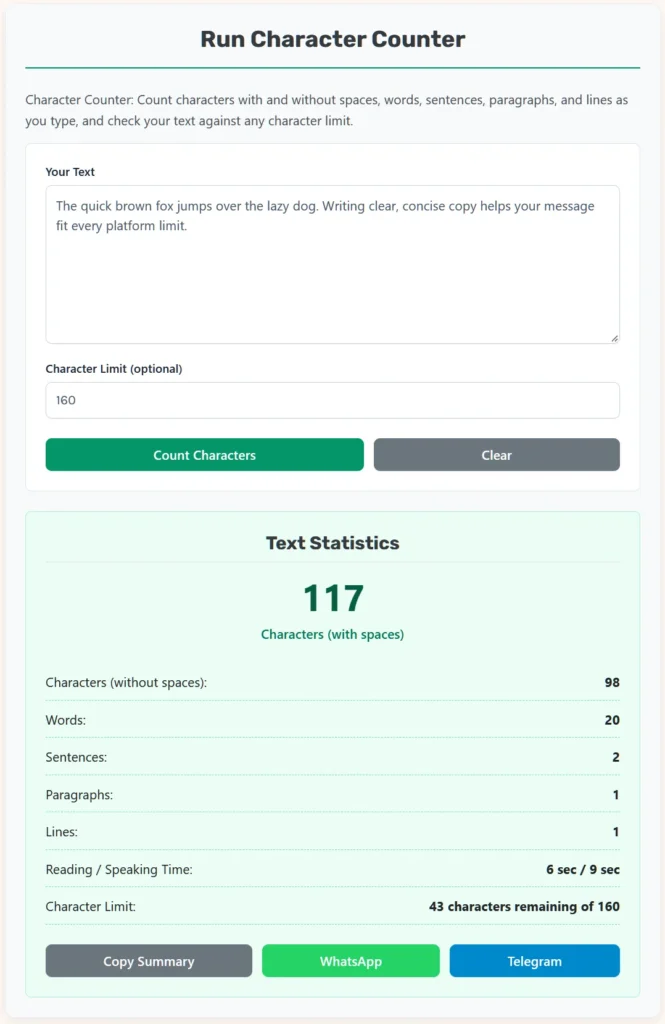
Character Counter: Count characters with and without spaces, words, sentences, paragraphs, and lines as you type, and check your text against any character limit.
Character Counting Explained
What Counts as a Character
Every letter, number, space, punctuation mark, and symbol is one character. Emoji and accented letters are counted as the single character you see, even when they are stored as several code units.
Characters (no spaces) = All Characters − Spaces, Tabs, and Line Breaks
Reading Time ≈ Words ÷ 200 per minute
Words, Sentences, Paragraphs
Words are groups of characters separated by spaces or line breaks. Sentences end with a period, question mark, or exclamation mark. Paragraphs are separated by a blank line.
How Many Characters Are in My Text?
A character counter counts the number of characters in a piece of text, both with and without spaces. This one also counts words, sentences, paragraphs, and lines, estimates reading and speaking time, and checks your text against any character limit you set.
Character limits are everywhere: social media posts, text messages, meta descriptions, ad headlines, form fields, product titles, and application essays. Exceeding a limit can cut off your message or cause a submission to be rejected.
The counter updates as you type, so you can edit your text and watch the numbers change in real time. Nothing you type is sent anywhere; all counting happens in your browser.
The sections below explain how each statistic is counted, list common character limits, and show examples.
What Is a Character Counter?
A character counter is a text analysis tool. It treats every visible symbol, space, and line break as part of the text and reports totals that writers, marketers, students, and developers rely on.
The most important distinction is between characters with spaces and characters without spaces. Most platforms count spaces, so “characters with spaces” is usually the number to check against a limit. Some academic and translation tasks use characters without spaces.
How Does the Character Counter Work?
- Characters: The text is split into user-perceived characters, so an emoji or an accented letter counts as one character.
- Characters without spaces: Spaces, tabs, and line breaks are excluded.
- Words: The text is split wherever there is whitespace.
- Sentences: Groups of periods, question marks, and exclamation marks followed by a space or the end of the text mark sentence endings.
- Paragraphs: Blocks of text separated by at least one blank line.
- Lines: Every line break starts a new line.
- Reading and speaking time: Words divided by 200 words per minute for reading and 130 for speaking.
Characters Without Spaces = Total Characters − Whitespace Characters
Reading Time (minutes) ≈ Words ÷ 200
Speaking Time (minutes) ≈ Words ÷ 130
Example: A Single Sentence
Consider the sentence: “The quick brown fox jumps over the lazy dog.”
- Characters with spaces: 44
- Spaces: 8
- Characters without spaces: 36 (35 letters and 1 period)
- Words: 9
- Sentences: 1
This sentence is famous because it contains every letter of the English alphabet, which makes it a handy test string for fonts and keyboards.
Example: Checking a Text Message Limit
A traditional SMS segment holds up to 160 characters when the message uses the standard GSM character set. If you set the limit to 160 and paste a 172-character message, the counter shows that you are over the limit by 12 characters.
Messages that include emoji or certain special characters use a different encoding, which reduces the number of characters per segment. Phones then split the message into several parts.
Common Character Limits
| Platform or Use | Typical Limit | Notes |
|---|---|---|
| X (Twitter) post | 280 characters | Standard accounts |
| SMS text message | 160 characters per segment | GSM-7 encoding |
| Meta description | About 150–160 characters | Search results may truncate longer text |
| Page title tag | About 50–60 characters | Display depends on pixel width |
| Instagram caption | 2,200 characters | |
| Email subject line | About 40–60 characters | Shorter subjects display fully on more devices |
Limits for search results are guidelines rather than fixed rules, because search engines truncate based on display width. Platform limits can change, so check the current rules for critical submissions.
Why Emoji and Accented Letters Can Be Tricky
Computers store text as sequences of code points, and some characters you see as one symbol are built from several code points. A family emoji, a flag, or a letter with a combining accent may be stored as two to seven code points.
This counter groups code points into user-perceived characters, known as grapheme clusters, following the rules in the Unicode Standard Annex #29 on text segmentation. That is usually how a person would count the characters.
Some platforms count differently, for example by counting code units. If a platform reports a different number for text with emoji, its counting method is the reason.
How Words Are Counted
A word is any group of characters separated by spaces, tabs, or line breaks. That means:
- “well-known” counts as one word.
- “don’t” counts as one word.
- “3.14” counts as one word.
- A standalone dash surrounded by spaces counts as a word.
Different word processors handle hyphens, dashes, and numbers slightly differently, so word counts can vary by a small amount between tools.
How Sentences and Paragraphs Are Counted
The counter treats a period, question mark, or exclamation mark followed by a space or the end of the text as the end of a sentence. Text without any ending punctuation counts as one sentence.
Abbreviations such as “Dr.” or “e.g.” can be counted as sentence endings, because no simple rule can always tell an abbreviation from the end of a sentence. Use the sentence count as an estimate.
Paragraphs are separated by a blank line. A single line break inside a block of text starts a new line but not a new paragraph.
Reading Time and Speaking Time
Reading time helps you plan articles, newsletters, and documentation. Speaking time helps you plan presentations, videos, and speeches.
| Word Count | Reading Time (200 wpm) | Speaking Time (130 wpm) |
|---|---|---|
| 100 words | 30 sec | 46 sec |
| 300 words | 1 min 30 sec | 2 min 18 sec |
| 500 words | 2 min 30 sec | 3 min 51 sec |
| 1,000 words | 5 min | 7 min 42 sec |
| 2,000 words | 10 min | 15 min 23 sec |
Actual reading and speaking speeds vary from person to person and with the complexity of the text. Technical material is usually read more slowly.
Practical Uses of a Character Counter
SEO and Web Content
Keep title tags and meta descriptions short enough to display fully in search results.
Social Media
Draft posts that fit platform limits without being cut off.
Advertising
Ad platforms often limit headlines and descriptions to a fixed number of characters.
Academic Writing
Application essays and abstracts frequently have character or word limits.
Software and Databases
Developers check that text fits form fields, database columns, and interface labels.
Translation and Localization
Translated text is often longer or shorter than the original. Character counts help fit translations into fixed spaces.
Tips for Shortening Text
- Remove filler words such as “very”, “really”, and “just”.
- Replace long phrases with single words, such as “because” instead of “due to the fact that”.
- Use numerals instead of spelled-out numbers where appropriate.
- Cut duplicated ideas.
- Use active voice, which is usually shorter than passive voice.
Character Count vs. Word Count: Which Should You Use?
Both measures describe length, but they suit different situations.
- Use character count when the limit is technical: social posts, SMS, ad text, metadata, form fields, and interface labels. These systems store or display a fixed number of characters.
- Use word count when the limit is editorial: essays, articles, assignments, and speeches. Word count reflects how much content you have written.
Some instructions specify both. When in doubt, check the exact wording of the requirement and whether spaces are included.
Counting Characters in Other Languages
The counter works with any language and script. Accented Latin letters, Cyrillic, Greek, Arabic, Hebrew, and many other scripts are counted as one character per visible letter.
Languages such as Chinese and Japanese do not use spaces between words, so the word count is less meaningful for them. In those languages, character count is the standard measure of length.
For scripts that combine several marks into one visible unit, such as letters with stacked diacritics, the counter follows Unicode grapheme rules so that each visible unit counts once.
Using the Counter for Social Media Drafts
- Paste or type your draft into the text box.
- Enter the platform’s limit in the limit field, such as 280.
- Edit until the counter shows characters remaining.
- Remember that links, mentions, and emoji may be counted differently by the platform.
- Copy the final text back to the platform and confirm the count there.
Because the counter updates as you type, you can try different wordings quickly and keep the version that fits best.
Common Mistakes When Counting Characters
Forgetting That Spaces Count
Most character limits include spaces. Check the “with spaces” total unless the instructions say otherwise.
Ignoring Line Breaks
Line breaks are characters too, and some platforms count them.
Pasting Formatted Text
Text copied from documents may include hidden spaces or special quotation marks. Review the count after pasting.
Assuming Emoji Count as One Everywhere
Some platforms count emoji as two or more characters.
Frequently Asked Questions About Character Counting
Do spaces count as characters?
Yes. Spaces are characters and are included in the “with spaces” total. The counter also shows a total without spaces.
How many characters are in “The quick brown fox jumps over the lazy dog.”?
44 characters with spaces and 36 without spaces.
How are words counted?
Words are groups of characters separated by spaces, tabs, or line breaks.
How many characters can an SMS have?
A standard SMS segment can contain up to 160 characters using the GSM-7 character set. Messages with emoji or certain symbols use a different encoding with fewer characters per segment.
How long should a meta description be?
Many SEO guides suggest about 150 to 160 characters, because longer descriptions may be truncated in search results.
Does the counter store my text?
No. All counting happens in your browser, and the text is not sent to a server.
How is reading time calculated?
The counter divides the number of words by 200 words per minute for reading and by 130 words per minute for speaking.
Why do different tools give different counts?
Tools treat emoji, hyphens, line breaks, and abbreviations differently. This counter follows Unicode text segmentation for characters.
Do line breaks count as characters?
Yes, line breaks are included in the total with spaces and excluded from the total without spaces.
Can I set a custom character limit?
Yes. Enter any limit and the counter shows how many characters remain or how far over the limit you are.
What the Character Counter Does Not Determine
- Grammar, spelling, or readability scores
- Pixel width of text in search results
- Platform-specific counting rules that differ from Unicode
- Plagiarism or originality
Best Practices for Writing to a Limit
- Write your full message first, then edit to fit.
- Set the exact limit in the counter.
- Keep a small buffer below the limit when possible.
- Check the final count on the target platform.
- Review emoji and special characters, which may count differently.
Scientific Basis and Reliable Sources
The counter splits text into user-perceived characters (grapheme clusters) using the browser’s implementation of Unicode text segmentation, counts words by whitespace, and estimates reading and speaking time from average words-per-minute rates.
Unicode Consortium — Unicode Standard Annex #29: Unicode Text Segmentation
UAX #29 defines how text is divided into user-perceived characters (grapheme clusters), words, and sentences, which is the basis for accurate character counting.
Final Character Count Checklist
- Correct total chosen (with or without spaces)
- Character limit entered for the target platform
- Emoji and special characters reviewed
- Line breaks considered
- Final text checked on the destination platform
With the character counter, you can write confidently to any length requirement and see exactly how long your text is as you type.